Crypto Transaction Detection in Bank Statements
When money moves into cryptocurrency, the bank statement is usually the only record that shows where it left. eFraud Investigator flags every payment to a crypto exchange, crypto ATM operator or crypto payment processor in the statements you upload, ties each one to its source page, and highlights the patterns investigators look for. Crypto flags are included in every case at no additional charge.
How does eFraud Investigator find crypto transactions in bank statements?
As statements are transcribed, each counterparty is checked against a maintained list of crypto companies. Matches are flagged by type and placed in a review queue for the investigator. The transaction description stays exactly as the bank printed it, including ACH company IDs and wire reference numbers, so nothing is reworded or inferred.
Flagged counterparties are grouped by type:
| Type | Examples |
|---|---|
| Crypto exchange | Coinbase, Binance.US, Crypto.com |
| Crypto ATM operator | Bitcoin Depot, CoinFlip |
| Crypto on-ramp / payment processor | MoonPay |
| Crypto (other) | Online banking bitcoin purchases and similar |
What red-flag patterns does it surface?
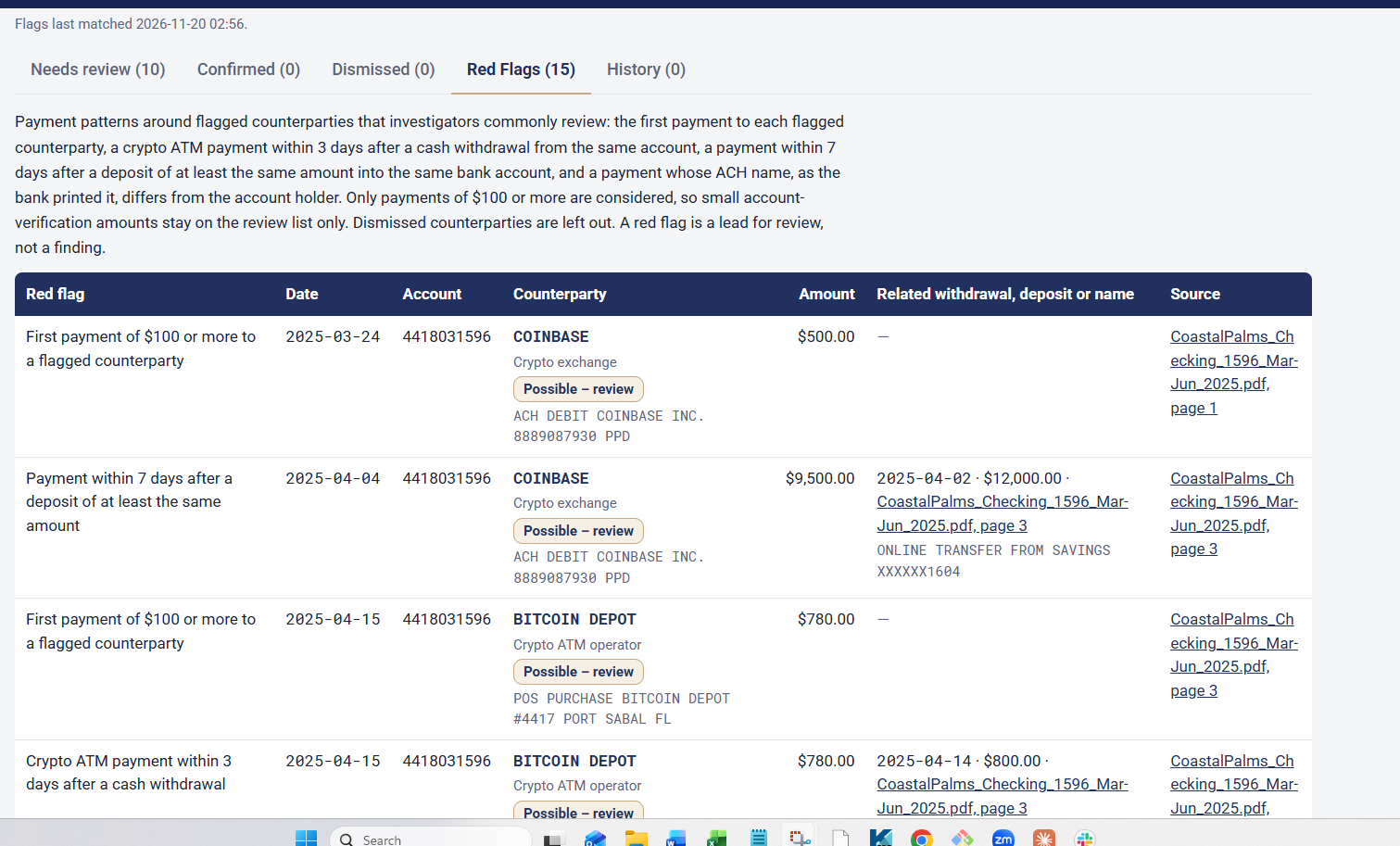
Beyond identifying crypto payments, eFraud Investigator highlights the payment patterns investigators commonly review:
- First payment to each flagged counterparty. When did money first start going to this exchange or ATM?
- Crypto ATM payment within 3 days after a cash withdrawal from the same account: cash taken out, then fed into a bitcoin ATM.
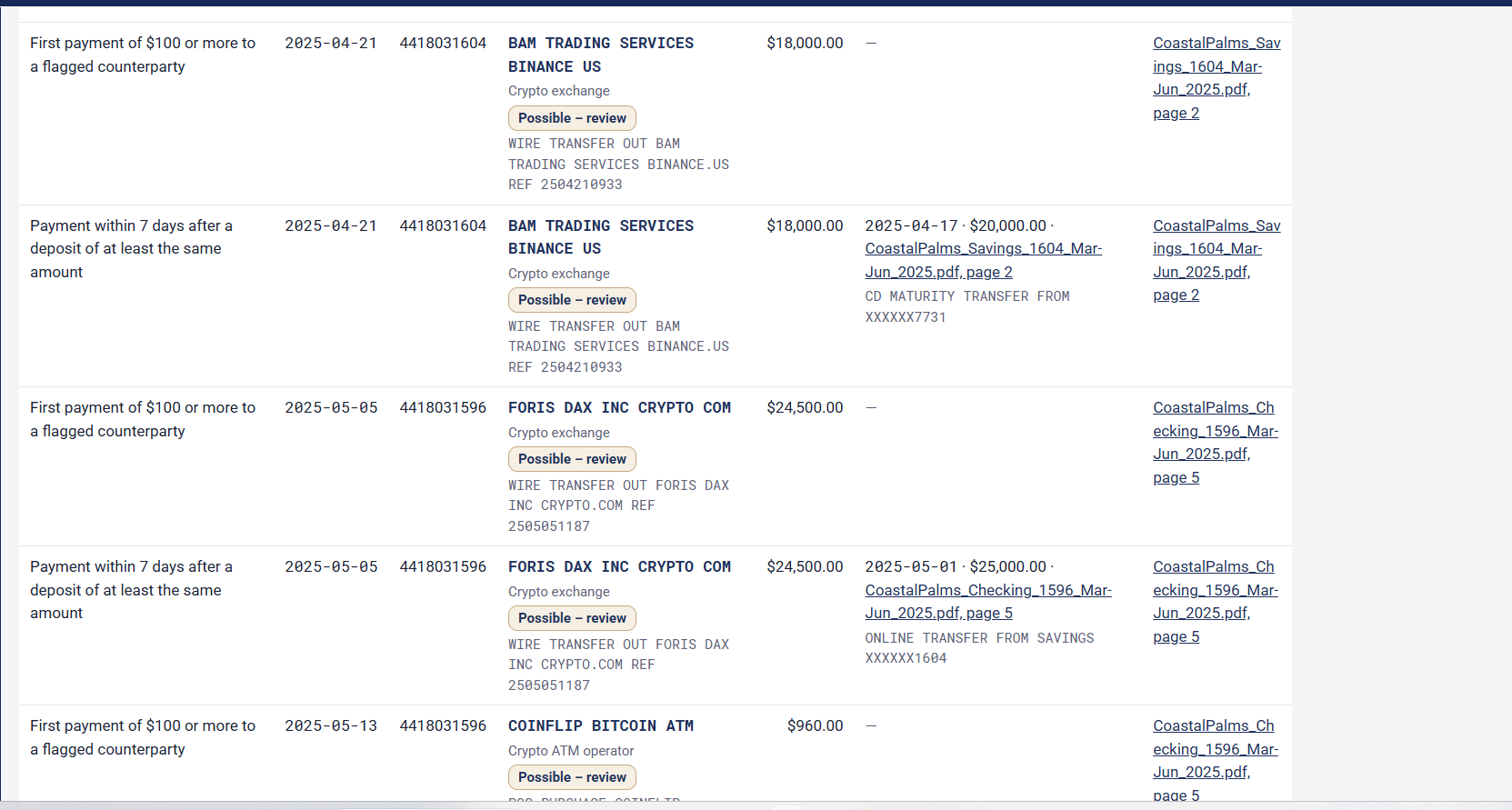
- Payment within 7 days after a deposit of at least the same amount into the same account: money moved in, then moved straight out to crypto.
- ACH name different from the account holder: a payment whose name, as the bank printed it, does not match the person who owns the account.
Only payments of $100 or more are considered, so small account-verification deposits stay out of the way. Each red flag shows the related withdrawal or deposit with a link to its own source page.
Example: a crypto investment scam
In our Whitcomb sample case, a fictional crypto investment scam, the victim's two Coastal Palms Bank accounts were uploaded: a checking and a savings account covering March to June 2025. eFraud Investigator flagged 10 crypto counterparties and 15 red-flag patterns, including:
| Date | Counterparty | Amount | Red flag |
|---|---|---|---|
| Apr 4, 2025 | Coinbase | $9,500.00 | Sent 2 days after a $12,000 transfer in from savings |
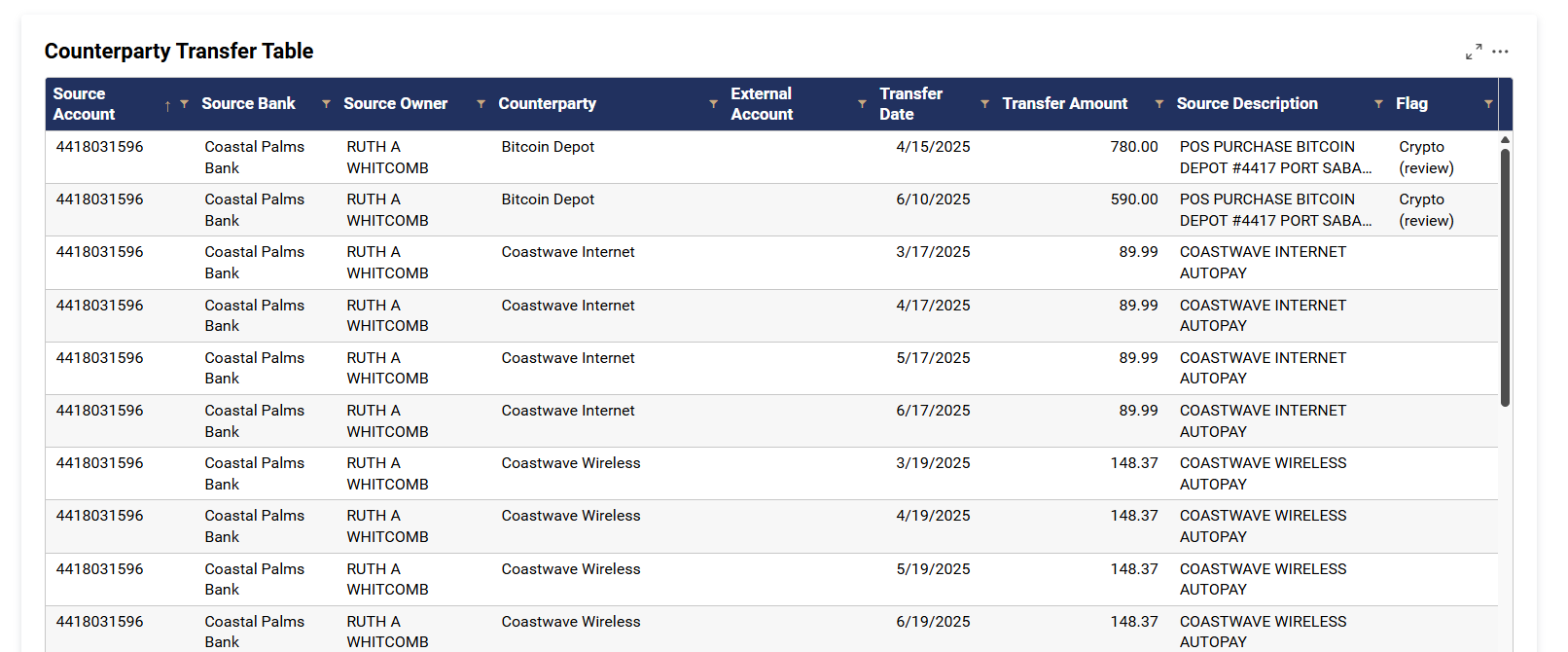
| Apr 15, 2025 | Bitcoin Depot | $780.00 | Crypto ATM purchase the day after an $800 cash withdrawal |
| Apr 21, 2025 | Binance.US | $18,000.00 | Wired 4 days after a $20,000 CD maturity transfer |
| May 5, 2025 | Crypto.com | $24,500.00 | Wired 4 days after a $25,000 transfer from savings |
| Jun 23, 2025 | MoonPay | $1,150.00 | First payment to a crypto payment processor |
In four months, $64,233.85 moved from the victim's accounts to crypto platforms, much of it within days of money being moved in from savings or a maturing CD. Every row links to the exact statement page it came from. The same flags appear in divorce matters, when one spouse moves marital funds to an exchange or crypto ATM.
Why it matters in scam, family law and fraud cases
- Investment scams: victims are often directed to move savings into crypto in stages, through exchanges and bitcoin ATMs.
- Divorce: crypto purchases can point to marital assets moved where a financial affidavit may not show them.
- Fraud and embezzlement: diverted funds are often converted to crypto soon after they are taken.
- Elder exploitation: repeated crypto ATM deposits are a common sign of scams that target older adults.
In each case, the bank statement shows where the money entered crypto. That gives you the exchange or ATM operator to subpoena next, and the starting point for blockchain tracing.
The investigator decides
Where crypto flags appear
- Review flagged counterparties: the review queue, with Needs review, Confirmed, Dismissed and Red Flags tabs.
- Counterparty Flow tab of the dashboard: a Flag column on the transfer table marks each crypto payment.
- Case Excel download: a dedicated sheet lists the flagged counterparties.
Common questions
Can eFraud Investigator detect cryptocurrency transactions in bank statements?
Yes. eFraud Investigator flags payments to crypto exchanges, crypto ATM operators and crypto payment processors in bank statements, such as Coinbase, Binance.US, Crypto.com, Bitcoin Depot, CoinFlip and MoonPay. Each flag links to the statement page it came from, and the investigator confirms or dismisses it.
Does crypto flagging cost extra?
No. Crypto flags are included in every case at no additional charge.
Does a crypto flag prove wrongdoing?
No. A red flag is a lead for review, not a finding. eFraud Investigator shows the transaction exactly as the bank printed it and links to its source page, and the investigator decides what it means.
Start free with 50 pages →